
What is Technical SEO? Technical SEO is an essential part of search engine optimization that helps search engines easily crawl, understand, and index your website. While many people focus mainly on keywords, quality content, and backlinks, the technical foundation of a website is equally important for achieving better search visibility.
Even if you publish excellent content, your website may struggle to rank if it has technical issues. Slow loading speed, broken links, poor mobile usability, incorrect indexing settings, and other technical problems can negatively affect both user experience and search engine performance.
Technical SEO helps create a strong foundation for your website by improving its speed, structure, security, and accessibility. It makes your website easier for both users and search engines to navigate and understand.
In this beginner-friendly guide, you’ll learn what Technical SEO is, why it matters, its key elements, common mistakes, and the best practices you can follow to improve your website’s technical performance.When learning about SEO, many people focus mainly on keywords, quality content, and backlinks. While these are essential parts of SEO, there is another important aspect that works behind the scenes—Technical SEO.
Technical SEO ensures that search engines can easily find, crawl, understand, and index your website. Even if you publish excellent content, your website may struggle to rank if it has technical issues. A slow website, broken links, poor mobile usability, or indexing errors can negatively affect both user experience and search engine rankings.
Technical SEO helps create a strong foundation for your website. It improves performance, makes your site easier to navigate, and ensures that search engines can access your pages efficiently. In this guide, you’ll learn what Technical SEO is, why it matters, its key elements, and best practices for beginners.
What is Technical SEO?
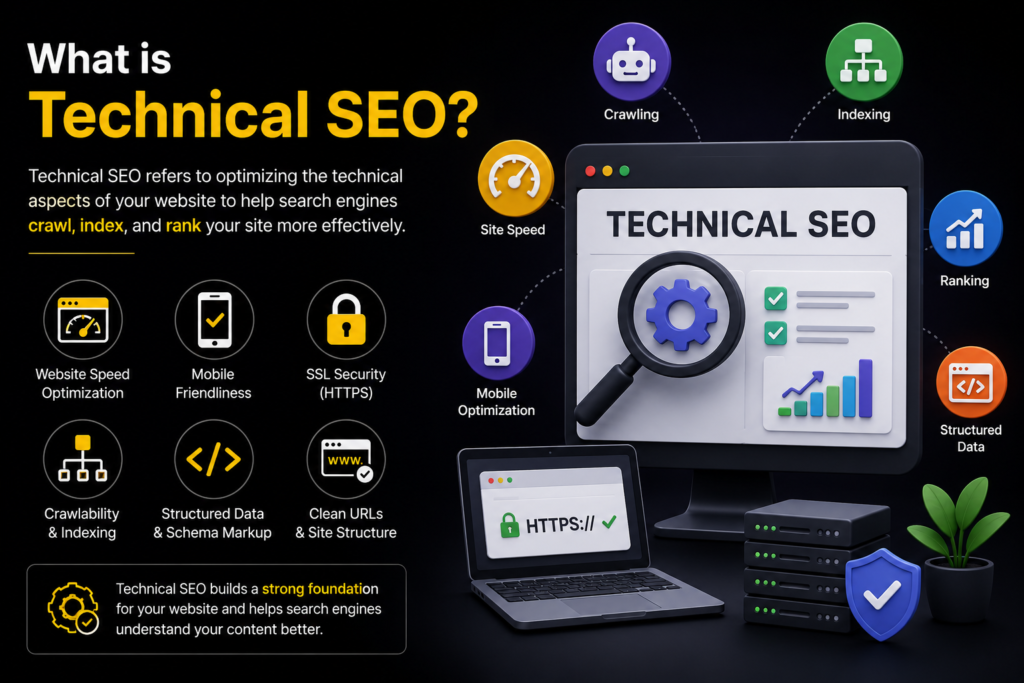
Technical SEO is the process of optimizing the technical aspects of a website so that search engines can crawl, index, and rank its pages more effectively. It focuses on the website’s structure, speed, security, and overall performance rather than the content itself.
Unlike on-page SEO, which deals with keywords and content optimization, Technical SEO works behind the scenes to ensure your website is easy for both users and search engines to access.
Its main goal is to remove technical barriers that could prevent your website from appearing in search results.
Why is Technical SEO Important?
Technical SEO is important because search engines want to provide users with the best possible experience. If a website loads slowly, contains errors, or is difficult to navigate, it is less likely to rank well.
Here are some key benefits of Technical SEO:
- Improves website crawling and indexing.
- Increases website loading speed.
- Enhances user experience.
- Makes websites mobile-friendly.
- Strengthens website security.
- Reduces technical errors.
- Supports better search engine rankings.
- Helps search engines understand your website structure.
Without Technical SEO, even high-quality content may not achieve its full ranking potential.
How Technical SEO Works
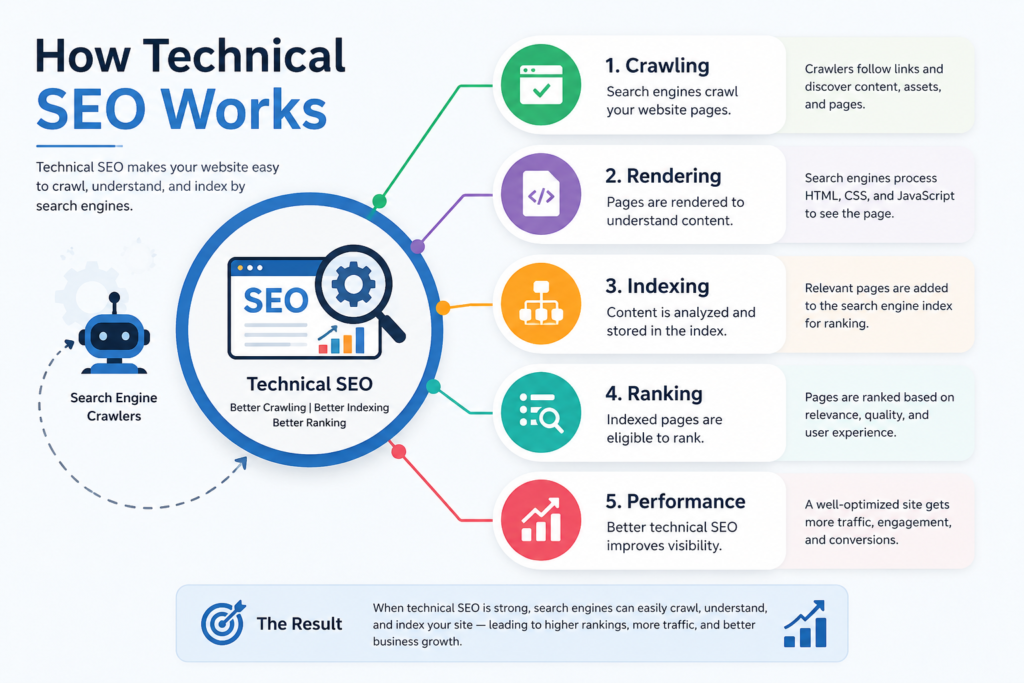
Search engines follow three main steps before showing your website in search results:
1. Crawling
Search engines use automated bots, often called crawlers or spiders, to discover pages across the web. These bots follow links and collect information about your website.
2. Indexing
After crawling your pages, search engines store the information in their index. Only indexed pages are eligible to appear in search results.
3. Ranking
When someone performs a search, search engines analyze many ranking factors to decide which pages are most relevant. A technically optimized website is more likely to achieve better search engine rankings and overall performance.
Technical SEO helps each of these steps happen smoothly.
Key Elements of Technical SEO
1. Website Speed
Website speed is one of the most important technical SEO factors.
A slow website can lead to:
- Higher bounce rates
- Poor user experience
- Lower search rankings
- Fewer conversions
To improve speed:
- Compress images.
- Minimize CSS and JavaScript files.
- Use browser caching.
- Choose reliable web hosting.
- Remove unnecessary plugins.
Fast websites keep visitors engaged and perform better in search results.
2. Mobile-Friendly Design
Most internet users browse websites using smartphones. Search engines prioritize websites that work well on mobile devices.
A mobile-friendly website should:
- Adjust to different screen sizes.
- Load quickly.
- Display readable text.
- Have easy-to-click buttons.
- Offer simple navigation.
Responsive web design is the best way to ensure your site works across all devices.
3. Secure Website (HTTPS)
Website security is essential for both users and search engines.
A secure website uses HTTPS, which encrypts data between the browser and the server.
Benefits include:
- Protecting user information.
- Building customer trust.
- Improving search rankings.
- Creating a safer browsing experience.
Visitors are more likely to trust websites that display a secure connection.
4. XML Sitemap
An XML sitemap is a file that helps search engines find and understand the important pages on your website. It helps search engines discover and crawl your content more efficiently.
A good sitemap should:
- Include important pages.
- Be updated regularly.
- Exclude duplicate or unnecessary pages.
Submitting your sitemap to search engines can improve the discovery of new content.
5. Robots.txt File
The robots.txt file tells search engine crawlers which parts of your website they can or cannot access.
It helps:
- Prevent crawling of unnecessary pages.
- Save crawl budget.
- Protect certain sections of your website.
Incorrect settings can block important pages, so this file should be configured carefully.
6. Fix Broken Links
Broken links lead visitors to pages that no longer exist.
Too many broken links can:
- Frustrate users.
- Reduce website credibility.
- Make crawling less efficient.
Regularly checking and fixing broken links improves both user experience and SEO.
7. Improve Website Structure
A clear website structure makes navigation easier for both visitors and search engines.
A good structure includes:
- Logical page organization.
- Clear navigation menus.
- Internal linking between related pages.
- Simple URL structures.
An organized website helps search engines understand the relationships between your pages.
8. Optimize URLs
SEO-friendly URLs are clear, concise, and accurately describe the page content.
Example:
Good:
yourwebsite.com/technical-seo-guide
Keep your URLs clean by removing unnecessary numbers, symbols, and extra characters.
Clear and simple URLs make websites easier to use and help search engines understand page content.
9. Remove Duplicate Content
Duplicate content occurs when the same or very similar content appears on multiple pages.
This may make it difficult for search engine to understand your content, which can affect your rankings.
Ways to prevent duplicate content include:
- Creating original content.
- Using canonical tags when appropriate.
- Avoiding unnecessary duplicate pages.
Unique content helps search engines identify the correct page to rank.
10. Structured Data
Structured data is a standardized way of providing additional information about your webpage to search engines.
It helps search engines better understand your content and may improve how your pages appear in search results.
Examples include information about:
- Articles
- Products
- Reviews
- Events
- Businesses
Using structured data can make your search listings more informative.
Common Technical SEO Mistakes
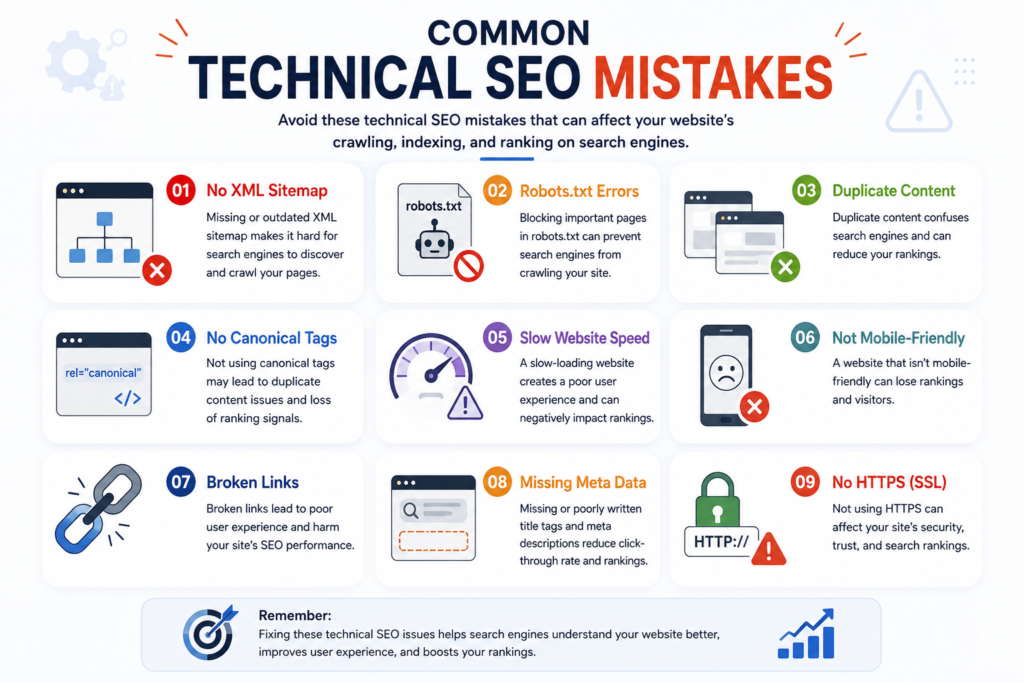
Many websites lose valuable traffic because of technical problems.
Common mistakes include:
- Slow-loading pages.
- Missing HTTPS.
- Broken internal links.
- Poor mobile usability.
- Duplicate content.
- Incorrect robots.txt settings.
- Missing XML sitemap.
- Large, unoptimized images.
- Crawl errors.
- Poor website structure.
Regular technical audits can help identify and fix these issues.
Technical SEO Best Practices
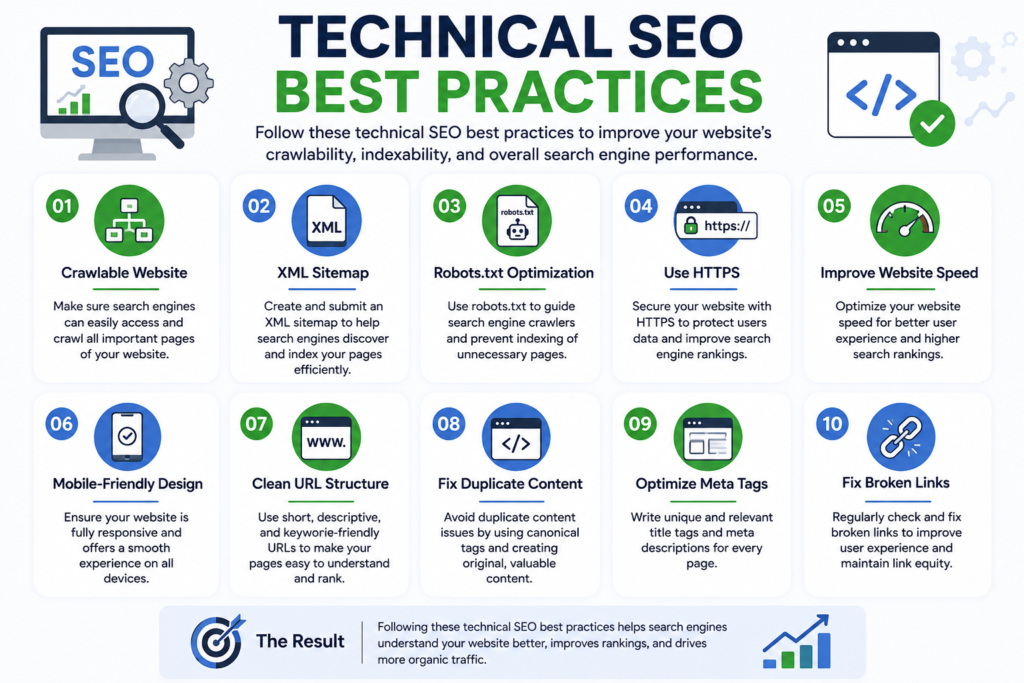
To maintain a technically healthy website:
- Improve page loading speed.
- Use HTTPS for security.
- Create a responsive design.
- Submit an XML sitemap.
- Check for crawl errors regularly.
- Optimize URLs.
- Fix broken links.
- Improve internal linking.
- Compress images.
- Monitor website performance.
Technical SEO is an ongoing process, so regular maintenance is essential.
If you want any Digital Marketing Services for your Business, Contact Me
Conclusion
Technical SEO is the foundation of a successful website. While great content and strong keywords are important, they cannot achieve their full potential if search engines cannot properly crawl, index, or understand your website.
By improving website speed, ensuring mobile friendliness, using HTTPS, maintaining a clean site structure, fixing broken links, and optimizing technical elements, you create a better experience for both users and search engines.
For beginners, focusing on Technical SEO may seem challenging at first, but even small improvements can have a significant impact over time. When combined with quality content and effective on-page SEO, Technical SEO helps your website perform better, rank higher, and attract more organic traffic. Investing in Technical SEO today is an important step toward building a strong and successful online presence.